Your Mouse Didn't Move, but the Menu Thinks It Did
 Łukasz Holeczek
Follow Łukasz Holeczek on GitHub
Connect with Łukasz Holeczek on LinkedIn
Follow Łukasz Holeczek on X (Twitter)
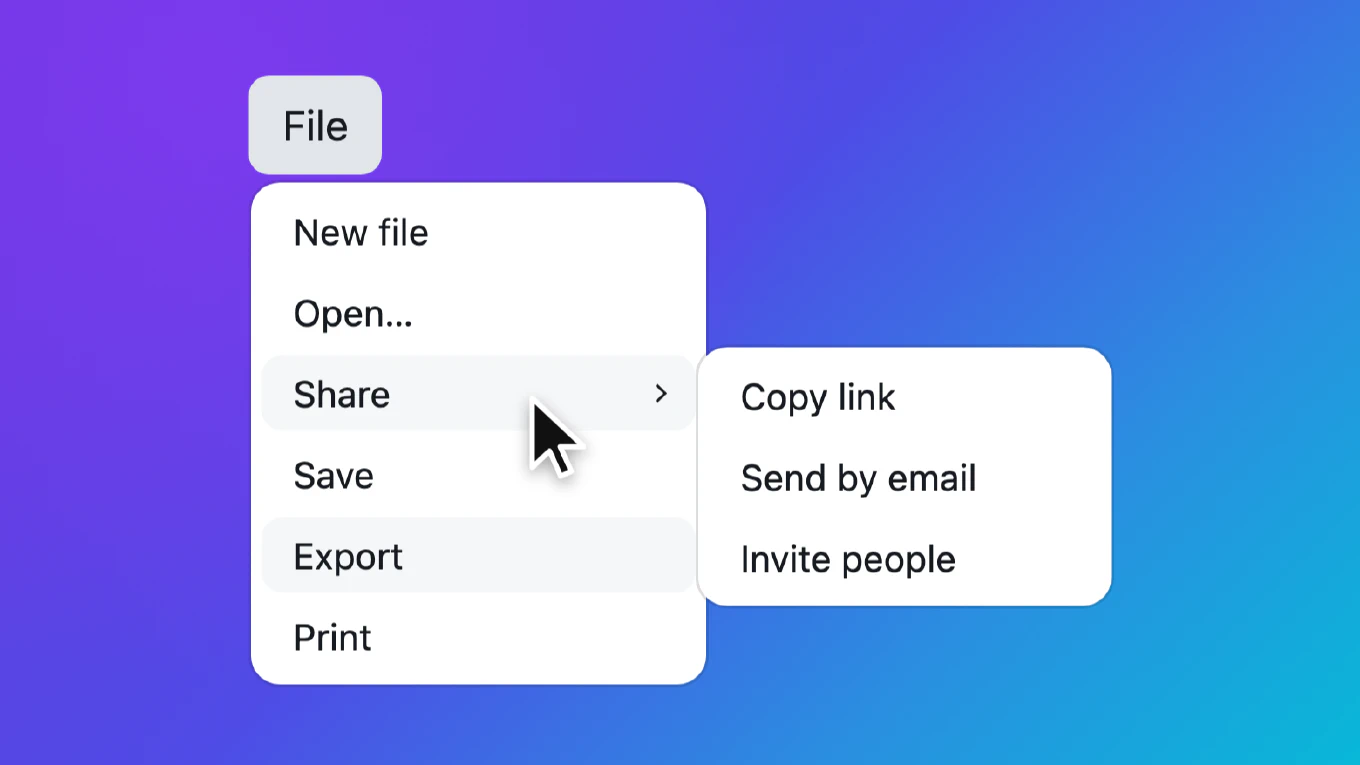
Picture a long menu with a scrollbar. A user opens it from the keyboard and walks down the items with the arrow keys, while their mouse just lies on the desk with the pointer somewhere over the panel. The list scrolls, a submenu trigger slides under the resting pointer, and its submenu pops open. One more arrow press, the trigger slides away, and the submenu closes again.
Nobody touched the mouse. The browser decided that the pointer had entered a new element, and the menu believed it. This guide shows why that happens, how to tell a hover the user made from one the browser made up, and how to test it.
Speed up your responsive apps and websites with fully-featured, ready-to-use open-source admin panel templates—free to use and built for efficiency.




What the browser sends when content moves
Hover in a browser is not about the mouse moving. It is about which element is under the pointer. When the element under a still pointer changes, because the page scrolled, a panel opened, or a node was inserted, the browser updates the hover state and fires the boundary events that go with it.
We put a still pointer over a scrollable menu and pressed the arrow keys in Chromium, Firefox and Safari on the desktop. This is what each item received when it scrolled under the pointer:
- Chromium and Firefox:
pointerover,mouseoverandmouseenter, with the same screen position as the last real pointer move. Nopointermoveormousemove. - Safari: the same three, and then a
pointermoveand amousemoveas well, again at the same position, withmovementXandmovementYboth0.
Any real move of the mouse, even by a pixel, produced a mousemove with a
non-zero movementX or movementY in all three.
So a menu that opens a submenu on mouseenter opens it during keyboard
navigation. In our measurement the focus stayed where the arrow keys put it,
and the submenu flashed open and shut beside it. That is distracting for any
keyboard user, and worse for someone using a screen magnifier, who often leaves
the pointer parked over the content they are reading. If your menu also moves
the focus or the highlight on hover, which many menus do, the keyboard
position can jump to the item under the pointer. We did not measure that
variant, but it follows from the same events.
Approaches that do not work
Open on mouseenter or pointerenter
This is the common approach, and it is the one the browser fools. An open delay helps only by luck: a trigger that stays under the pointer for one key press is under it for longer than most delays.
Open on mousemove or pointermove
Several libraries open a submenu on pointermove instead of on enter. In
Chromium and Firefox that is enough, because scrolling sends no move event.
Safari sends one, so the submenu still opens there. We did not run those
libraries in Safari; this follows from the event sequence above.
Ignore hover while the keyboard is in use
A flag set on keydown and cleared on mousemove sounds tidy, but it has to
decide when the mouse is back in charge, and that decision comes from a
mousemove, which Safari sends on its own. It also adds state that every
key handler has to keep up to date.
Count a hover only when the pointer moved
The rule that holds in all three engines is simple: a hover counts only when the pointer actually moved.
You do not have to track the pointer position yourself. movementX and
movementY on a mouse event are the distance from the previous mouse event,
computed by the browser. A move the user made has a non-zero value on at least
one axis. A move the browser made up while scrolling has zero on both.
Headless UI solves the same problem by remembering the last screenX and
screenY and comparing them with each new event. That works too, and it is
what movementX/movementY give you for free.
The code
Here is the core of it for a menu where each submenu is a wrapper with a trigger and a panel:
<div class="menu" role="menu">
  <button class="menu-item" role="menuitem">New</button>
  <div class="submenu" role="none">
    <button class="menu-item" role="menuitem"
            aria-haspopup="menu" aria-expanded="false">More</button>
    <div class="menu" role="menu">…</div>
  </div>
</div>
const menu = document.querySelector('.menu')
let hovered = null
let pointerType = 'mouse'

menu.addEventListener('pointerover', event => {
  pointerType = event.pointerType
})

menu.addEventListener('mousemove', event => {
  const trigger = event.target.closest('.submenu > .menu-item')

  if (!trigger || trigger === hovered) {
    return
  }

  if (pointerType === 'mouse' && event.movementX === 0 && event.movementY === 0) {
    return
  }

  hovered = trigger
  openSubmenu(trigger)
})

menu.addEventListener('mouseout', event => {
  const submenu = hovered?.closest('.submenu')

  if (submenu && !submenu.contains(event.relatedTarget)) {
    hovered = null
    scheduleClose(submenu)
  }
})
Four details in there matter.
One listener on the menu, not one per trigger. A mousemove listener runs
many times a second. Put a single listener on the menu and find the trigger
with closest(). A delegated listener that matches a selector against every
trigger on every move costs more for nothing.
Once per entry. After a trigger has had its hover, more moves over it do
nothing until the pointer leaves its submenu. Without that, a user who clicks
the trigger to close the submenu and then nudges the mouse gets it open again
straight away. With mouseenter you got this for free, because it fires once
per entry; with mousemove you have to say it.
The check is for the mouse only. A tap on a touch screen sends emulated
mouse events after the touch, and their movementX and movementY may well be
zero. If your menu opens submenus only on hover, the tap would stop working.
The pointerover that comes before the emulated mouse events carries the
real pointerType, so you can keep the movement check for the mouse and let a
tap through as before. The fake pointerover from scrolling reports mouse,
so it does not open a loophole. We have not measured taps on phones; this keeps
the tap path working whatever the emulated move reports.
Forget the hover when the menu closes. When we closed a menu with the
pointer over a trigger and opened it again, Chromium and Firefox sent mouseout
as the panel disappeared, so the code above cleared hovered by itself. A menu
that moves its panel in the DOM, for example into <body> while it is open and
back when it closes, should not count on that event for a node it detached.
Clear the hovered trigger in your close function, and the next real move opens
the submenu again whatever the browser sent.
In React
React computes movementX and movementY on its synthetic mouse events, so
the same check works in a handler. Put it on the submenu wrapper and keep the
“once per entry” flag in a ref:
function Submenu({ trigger, children }) {
  const [open, setOpen] = useState(false)
  const hoveredRef = useRef(false)

  return (
    <div
      className="submenu"
      onMouseLeave={() => {
        hoveredRef.current = false
        setOpen(false)
      }}
      onMouseMove={(event) => {
        if (hoveredRef.current || (event.movementX === 0 && event.movementY === 0)) {
          return
        }

        hoveredRef.current = true
        setOpen(true)
      }}
    >
      <button aria-expanded={open} className="menu-item" onClick={() => setOpen((value) => !value)}>
        {trigger}
      </button>
      {open && <div className="menu">{children}</div>}
    </div>
  )
}
Here a tap goes through the click handler, so the touch case needs no extra
code. Vue works the same way with onMousemove and a plain variable.
Test it like a user
A unit test can check the rule itself. Dispatch the events a still pointer receives, and then a real move:
trigger.dispatchEvent(new MouseEvent('mouseover', { bubbles: true }))
trigger.dispatchEvent(new MouseEvent('mousemove', { bubbles: true }))
expect(submenu).not.toHaveClass('show')

trigger.dispatchEvent(new MouseEvent('mousemove', { bubbles: true, movementY: -1 }))
expect(submenu).toHaveClass('show')
Add one test for each part of the rule: a click that closed the submenu stays closed while the pointer moves on the trigger, leaving and coming back opens it again, and closing the menu forgets the hover. Then remove each condition from your code one at a time and make sure a test fails every time.
The real proof needs a browser, because the bug lives in what the browser sends. With Playwright the scenario is short:
await page.focus('#toggle')
await page.keyboard.press('ArrowDown')

const box = await page.locator('#menu').boundingBox()
await page.mouse.move(box.x + box.width / 2, box.y + 120)

for (let i = 0; i < 12; i++) {
  await page.keyboard.press('ArrowDown')
  expect(await page.locator('.submenu > .menu.show').count()).toBe(0)
}

await page.mouse.move(box.x + box.width / 2 + 3, box.y + 120)
Give the menu panel id="menu" and a fixed max-height so that it scrolls, and place a submenu far
enough down that the arrow keys bring it under the pointer. After the last
line, the submenu under the pointer should open. Run it in Chromium and
Firefox, and run the same steps in Safari, the only engine that also sends the
fake mousemove. If your Playwright WebKit build does not start, Safari’s own
WebDriver (safaridriver) can move the pointer and press keys just as well.
Common mistakes
- Opening on
mouseenter, or onpointermovewithout looking at the movement. - Checking only one axis: a vertical move has
movementXof0. - Reacting to every move instead of once per entry, which reopens a submenu the user just closed.
- Applying the movement check to touch input, where a menu that opens only on hover then cannot be opened at all.
- Keeping the hovered trigger after the menu closes and moves its panel back in the DOM.
- Testing only in Chromium, where the fake hover never comes with a move event.
How CoreUI handles it
The Menu in CoreUI v6, in
vanilla JavaScript,
React and
Vue, opens a submenu on
the first pointer move with a non-zero movementX or movementY, once per
entry, with the check limited to the mouse. Scrolling a long menu with the
arrow keys no longer opens the submenu that happens to pass under the pointer,
while a real move opens it at once, and the pointer path to an open submenu
keeps working as before. If you build your own menus on top of it, you get this
for free.